
SEE's Michelangelo's Sistine
Venkata Reddy GEvents
3.524.00 Reviews
- Version
- 3.1.1
- Installs
- 50.00K
- Age Rating
- Everyone
Screenshots

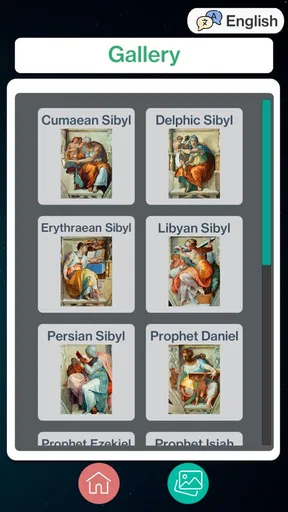
Our Review of SEE's Michelangelo's Sistine
 Analysis by Appyee
I approached SEE's Michelangelo's Sistine as a companion for a visit rather than as a general art-history app. Its purpose is focused: it supports the experience of SEE’s Michelangelo’s Sistine Exhibition with audio guidance. That narrow role is also its main appeal. Instead of asking you to search through a large museum platform, it gives you a dedicated place to use alongside the exhibition.
The app is free, rated for Everyone, and sits in the Events category. It was developed by Venkata Reddy G, has passed 50K+ installs, and currently carries a 3.4 average from 107 ratings and 22 reviews. Those figures suggest a useful but not universally smooth experience, which matches my impression: the app can make an exhibition visit more approachable, but it works best when you treat it as one part of the outing rather than the entire event.
What to expect before you arrive
The most important thing to understand is that this is an audio guide companion, not a replacement for the exhibition itself. I would not install it expecting a broad Michelangelo encyclopedia, a social art platform, or a tool for exploring every Renaissance work from home. Its value is tied to the specific exhibition experience and to the moments when you want spoken guidance while looking at the presentation.
That distinction matters because audio guides change how you move through an exhibition. You are not simply reading a wall label and walking on. You are listening, looking, and deciding how long to stay with a particular part of the display. For a first-time visitor, that can provide a helpful rhythm. It can also reduce the feeling of standing in front of a famous subject without knowing what deserves attention.
I found the concept especially suitable for visitors who prefer explanations delivered in small portions. Some people enjoy reading every label; others become tired quickly when faced with dense paragraphs. An audio-led format gives the eyes more freedom to examine the exhibition while the ears handle the background and interpretation. That is the strongest reason to try this app.
It is less convincing for someone who wants a complete art-history course or a flexible research tool. If your main goal is to compare Michelangelo with other artists, save extensive notes, or browse a large collection after the visit, a dedicated museum, art-history, or reference app will probably serve you better. This app is deliberately closer to a digital companion ticket than to a full learning library.
Because the app is connected to a physical exhibition, your best use case is simple: install it before leaving home, open it when you are ready to visit, and use the audio guidance as you move through the experience. I would avoid waiting until you are already inside and surrounded by other visitors. A few minutes of preparation can make the first interaction much calmer.
Who will get the most from it
I would recommend it most readily to a first-time exhibition visitor who wants context without hiring a personal guide. It can also suit families or mixed groups where one person wants more explanation while another prefers to look quietly. Since the content rating is Everyone, it is presented as suitable for a broad audience, although younger visitors may still need an adult to help them follow the listening experience and stay engaged.
It may also help visitors who feel unsure about museum etiquette. You do not need to interrupt a guide or ask a question in front of a group. You can listen privately and move at your own pace. That makes the experience less intimidating, particularly if this is your first exhibition focused on a major artist.
On the other hand, visitors who already know the Sistine Chapel story in depth may find the guidance too introductory or too fixed in its route. The app’s strength is giving structure to a visit, not necessarily offering endless layers for specialists. I would also skip it if you dislike listening through a phone in public or if you prefer to experience visual art without any spoken framing.
Installing it and preparing for the first visit
The app is available at no cost, which makes trying it a low-risk decision. It was released on Jul 23, 2022, and the current version is 3.0.0. It requires Android 7.0 or later, so anyone using an older Android device should check compatibility before planning around it. That requirement is not especially demanding by today’s standards, but an older phone can still affect how comfortable the visit feels.
My advice is to install it while you have a stable connection and enough time to look through the opening screen. Do not make the first launch part of a rushed entrance. The point is not to spend a long time configuring the app; it is to remove uncertainty before you need the guide.
Once installed, open the app and identify how it presents the exhibition guidance. Since this is a dedicated companion rather than a general-purpose audio player, I would look for the route or listening entry point instead of browsing randomly. If the app presents several pieces of information at once, resist the temptation to read everything before arriving. The useful preparation is knowing where to begin, not turning the pre-visit setup into a separate study session.
A practical tip is to bring your phone with enough battery for the whole outing. Audio guidance naturally keeps the screen and playback controls relevant, and a low battery can turn a pleasant visit into a frustrating one. I would also carry headphones if you normally prefer private listening, but keep the volume low enough to remain aware of the people around you. If you are visiting with someone else, decide in advance whether you will listen together or separately; that small choice prevents repeated stopping and restarting.
Another useful preparation step is to agree on a flexible meeting point with your group. Audio guides encourage people to move at different speeds. One person may pause to look closely while another finishes listening and continues. The app cannot solve that social problem, but a simple plan can. In my experience, this is more important than trying to make everyone press play at exactly the same moment.
Getting to the first meaningful action
The first successful action should be modest: start the exhibition guidance and listen to one complete segment while looking at the related presentation. That is a better test than opening every menu or trying to understand the entire app immediately. If you can begin playback, keep your attention on the exhibition, and finish the opening explanation without confusion, you already know whether the companion fits your visiting style.
I recommend standing slightly to one side rather than directly in the busiest viewing position when you begin. This gives you room to check the phone and then put it away from your face. The app is most useful when it supports looking, not when it becomes another screen demanding constant attention.
After the first segment, pause for a moment and decide whether the audio is helping you notice more. Are you looking at details you would have passed over? Are you understanding the subject more clearly? If the answer is yes, continue. If you feel that the narration is pulling you away from the visual experience, lower the volume, take longer pauses, or use the app only at selected points. A companion should serve your attention, not dictate it.
This is one of the less obvious trade-offs with any exhibition audio guide: more information does not automatically mean a better visit. I would rather listen carefully to a small portion and then spend quiet time looking than rush through every available explanation. The app works well when you use it as a prompt for observation, not as a checklist that must be completed.
Handling the moments that may feel confusing
First-time users may wonder whether they should keep the app open constantly. I would not. Open it when you are ready to listen, then let your attention return to the exhibition. Constantly checking the phone can make the visit feel like a mobile task rather than an encounter with the artwork.
You may also be unsure whether to follow the audio in a strict order. My approach would be to begin at the obvious starting point and then allow the physical layout and your interest to guide you. If a section catches your eye, stay there. If a narration is not holding your attention, pause rather than forcing yourself through it. The benefit of a personal audio companion is the ability to adjust your pace, even when the exhibition has its own intended flow.
Another common confusion is expecting the app to answer every question that comes to mind. An audio guide usually provides a curated interpretation, not a live expert who can respond to unusual details or personal research interests. If you want to investigate a date, attribution, restoration question, or theological reference in depth, you may need another source later. That is not a failure of this particular app; it is a limit of the format and of its focused role.
There is also a social consideration. If you are visiting with children, friends, or someone who cannot comfortably listen through headphones, do not assume one phone will work equally well for everyone. You may need to share the audio aloud at a considerate volume or take turns. That can be perfectly workable, but it changes the pace. For a group, I would treat the app as a source of selected explanations rather than trying to make every person follow every section.
The 3.4 average rating is a useful signal to keep expectations realistic. It does not make the app a poor choice, but it suggests that the experience may depend on the visitor’s device, habits, and expectations. I would install it because the price is free and the purpose is specific, while remaining prepared to enjoy the exhibition even if the digital side feels less polished than hoped.
Using it beyond the opening few minutes
Once you know how the guidance fits your attention, create a personal pattern for the rest of the visit. I like alternating between listening and silence: hear an explanation, look without the phone for a while, then return to the guide when a new section seems relevant. This makes the audio feel like a conversation with the exhibition rather than background noise.
A second practical technique is to use the audio as a way to compare your first impression with a more informed second look. Before starting a segment, notice what draws your eye. After listening, look again and see whether the explanation changes your focus. That small exercise turns passive listening into active viewing and is particularly useful for visitors who feel that famous art is difficult to approach.
If you are visiting on a tight schedule, do not measure success by finishing every piece of guidance. Choose the sections that seem most relevant to your interests and leave space for the physical experience. A short, attentive visit can be more rewarding than completing the entire audio sequence while barely looking up.
For a return visit, I would deliberately change the method. The first time, follow the guidance to gain orientation. On a later visit, listen to less and spend more time making your own observations. This lets the app remain useful without becoming the only voice shaping your understanding of Michelangelo’s work.
Compared with a printed leaflet, the app offers a more personal listening experience and can be easier for people who dislike reading while standing. Compared with a live guide, it is more flexible and private, but it cannot respond to questions or adapt its explanation to your interests. Compared with a broad art app, it is more focused on the exhibition and less useful for general browsing. Choosing between these options comes down to whether you value convenience, conversation, or depth.
When another option is the better choice
I would choose a live guide instead if your group wants discussion, questions, and a shared pace. A person can notice when visitors are confused or especially interested and adjust the explanation. This app cannot provide that human responsiveness.
I would choose a general art-reference service instead if your visit is mainly research-driven. Someone studying Renaissance art may want cross-references, timelines, biographies, and multiple interpretations. A focused exhibition companion is unlikely to replace those tools, and it should not be judged as though it were designed to do so.
I would also reconsider using it if your phone is old, your battery is unreliable, or you strongly dislike managing audio in public. The exhibition itself should remain worthwhile without depending on a digital layer. In that situation, a printed guide or a quiet self-guided visit may be more comfortable.
For everyone else, the app has a clear practical role. It lowers the barrier to beginning an art-focused visit, gives a newcomer something to listen for, and lets you control the pace more than a fixed spoken tour would. Its limitations are real, but they are easier to accept when you understand that it is a companion rather than the destination.
My recommendation after using it as a visitor
I see SEE's Michelangelo's Sistine as a sensible free download for anyone planning to attend SEE’s Michelangelo’s Sistine Exhibition and wanting audio support. The strongest path is to install it before leaving, open it calmly, begin with one segment, and then alternate listening with uninterrupted looking. That workflow keeps the technology useful without allowing it to dominate the visit.
The app is not aimed at every kind of art lover. It will not satisfy someone seeking an expansive Michelangelo database, a responsive personal tutor, or a fully social museum experience. It can also feel less compelling if you prefer to form an impression without narration. But for a first-time visitor who wants reassurance about where to begin, its focused design is an advantage.
With a current version of 3.0.0 and support for Android 7.0 or later, it remains accessible to many Android users. The broad Everyone rating also makes it a reasonable option for mixed-age outings, provided adults help younger visitors manage the listening and viewing balance. I would keep the phone charged, avoid rushing through the audio, and treat each explanation as an invitation to look more closely.
My final view is positive but measured: use it to enrich the exhibition, not to replace your own eyes. If you approach it that way, the app can give a first visit helpful structure while leaving room for curiosity, quiet observation, and your own response to the work.
Privacy and Permissions
See what permissions an app requests and how it handles your data.
- Camera
- take pictures and videos
- Other
- view network connections, full network access
Verdict
Strengths of SEE's Michelangelo's Sistine
- High-resolution artwork lets you examine famous details closely.
- Simple navigation makes the virtual tour accessible to most users.
- Useful captions provide context about scenes and figures.
- Works well for quiet, self-guided exploration at your own pace.
- A convenient way to preview the chapel before an in-person visit.
Limitations of SEE's Michelangelo's Sistine
- Some images may load slowly on older devices or weak connections.
- The experience cannot fully recreate the chapel’s scale and atmosphere.
- Small text can be difficult to read on compact phone screens.
- Limited interactivity may feel basic for users expecting a full VR tour.
- Content may be less useful without prior knowledge of the artwork.
Similar Picks in This Category
View All
Easy Quran Mp3 Audio Offline
Muslim Worldapp4.7

Invitation Maker: Cards & RSVP
Greetings Island4.9

StubHub - Live Event Tickets
StubHub4.3

Fever: Events & Tickets
Fever Labs4.7

Epic Freebie Games Radar
Arioch Pds - Apps & Games4.4

Invitation card Maker, Design
Splendid App Maker4.9
Frequently Asked Questions
What is SEE’s Michelangelo’s Sistine?
SEE’s Michelangelo’s Sistine is an educational and visual exploration app focused on Michelangelo’s famous frescoes in the Sistine Chapel. It is designed to let users examine the artwork closely, discover details that can be difficult to see in person, and learn more about the chapel, its decoration, and the artist’s work through an interactive digital experience.
What can I explore inside the app?
The app provides access to detailed views of the Sistine Chapel’s artwork, including well-known scenes from the ceiling and other important decorative elements. You can zoom into sections, move around the images, and inspect figures, gestures, colors, and architectural details. Informational content helps explain the biblical narratives, artistic techniques, and historical context behind the frescoes.
Is SEE’s Michelangelo’s Sistine suitable for students and beginners?
Yes. The app is suitable for students, casual art enthusiasts, and anyone who wants an accessible introduction to Michelangelo’s Sistine Chapel paintings. Its visual presentation makes the artwork easier to understand than a simple text-based guide. However, users looking for an extensive academic catalogue or highly specialized art-history analysis may find the explanations more introductory than scholarly.
Does the app require an internet connection?
Some features may depend on an internet connection, particularly when downloading the application, loading additional media, or accessing updated content. Because high-resolution artwork can require considerable storage and data, it is best to install or update the app over Wi-Fi. Availability of offline viewing may vary by device and version, so users should check the app’s current store description before traveling.
Is SEE’s Michelangelo’s Sistine free to download?
The download price and included features can vary depending on whether you use the Android or iOS version and whether the publisher changes its distribution model. Before installing, review the official store listing for the current price, in-app purchases, supported devices, and privacy details. Even when access is free, certain premium content or expanded educational features may require payment.
